

Stopping Microsoft Phishing Before It Lands — Our New Anti-Phishing Layer (At No Cost to Clients)
Phishing is still the way most attacks against Australian SMBs start, and the single most valuable thing an attacker can steal from your business is a Microsoft 365 login. One harvested password gets them into email, files, Teams and, more often than not, the keys to everything else. We’ve spent the past few weeks quietly rolling out a new layer of protection that sits in front of exactly that risk for every managed client. It’s now active across your team, it runs in the background, and there is no additional cost to you.
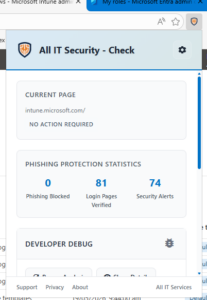
Email filters and multi-factor authentication are necessary, but they’re not enough on their own. Attackers now run convincing fake Microsoft sign-in pages, route victims to them through SMS, ads and forwarded emails, and capture credentials in seconds. By the time MFA prompts the user, the attacker is already standing in front of the real Microsoft login pretending to be them. The new protection layer addresses that gap by working inside the browser. The engine behind it is an open security tool called Check, integrated with our existing security monitoring stack (CIPP) so detections flow into the same tooling our team already uses to watch over your tenant.
The way it works is best thought of as block, verify, alert. When a staff member lands on a page that’s pretending to be Microsoft — suspicious domain, fake form, copied page title, dozens of signals scored together — the page is replaced with a warning before they can interact with it, which means there’s no opportunity to type a password into a fake. On legitimate Microsoft sign-in pages a small green “Verified Microsoft Domain” badge appears for a few seconds, and over time that quietly trains an instinct in your team: no badge, no password. And every detection is reported back to our monitoring with the user, device, URL and timestamp, so we see attempted attacks in near real time rather than when a ticket gets raised after the fact. The whole thing is centrally managed and deployed by policy, so users can’t accidentally turn protection off.
We’ve built this into your existing managed service because we think this kind of protection should be the baseline in 2026, not an optional extra. No new line item, no per-user fee, no contract change. If you have personal or BYO devices in the mix that aren’t yet covered, or you’d like a short walk-through for your leadership team on what’s being blocked and what we’re seeing in your environment, our cybersecurity team can sort it.