

IT Support Where Your Team Already Works
Real-time chat with our Australian service desk from inside Microsoft Teams or Slack. No portal to log into, no ticket number to quote, no email chain to start. Just type — and a technician answers.
Every IT provider says they're responsive. Then they hand your staff a support portal, a password nobody remembers, and a form with eleven fields.
Ask around your own office and you'll find people who've been putting up with something for weeks — a printer that needs restarting twice a day, a spreadsheet that takes ninety seconds to open, a shared mailbox that won't sync on mobile.
Nobody logs it, because logging it costs more effort than the workaround. So the workaround becomes permanent, quietly billing your business a few minutes a day, per person, forever.
These are also the cheapest issues in the world to fix, if only somebody knew about them. Chat lowers the cost of asking to roughly zero — so the small stuff surfaces while it's still small, and the person who tells you about it is the person who noticed, not the person who finally got frustrated enough to email.
That's the entire case for chat-based support: lower the barrier to ask, and problems get fixed before they become habits.
Five Steps. Zero New Accounts.
We add ALL IT Support to your existing Microsoft Teams or Slack workspace. Nothing to install on individual machines. No new password for your staff to create, forget, or reuse.
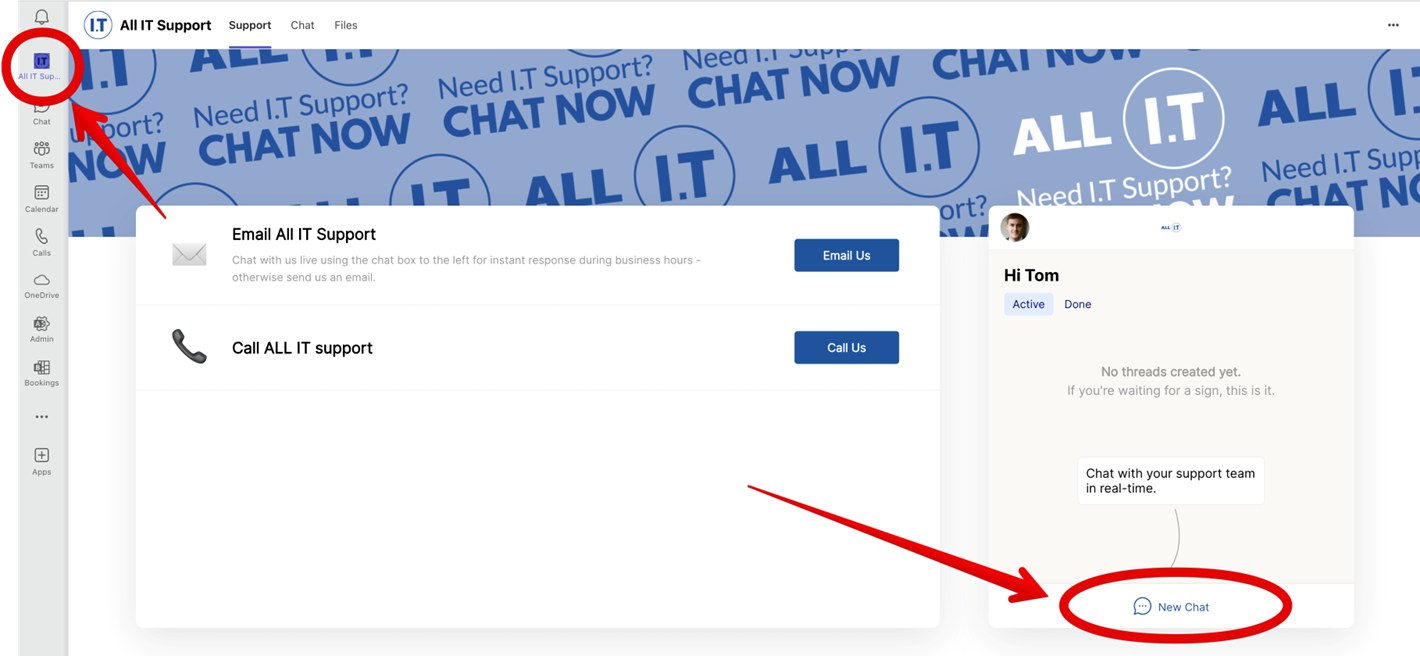
ALL IT Support appears in your Teams or Slack
We add it to your existing workspace. Your staff see it alongside the tools they already use all day — no separate app to keep open, no new account to create.
Your team clicks New Chat and describes the problem
In their own words. No categories to pick, no priority to guess at, no reference number to find first. Screenshots, error messages, photos of a screen taken on a phone — everything pastes straight into the conversation.
A technician picks it up and replies in the same thread
We already know who's asking, which company and site they're from, and what we've fixed for them before. That's why we usually skip the "can you send me a screenshot?" round trip entirely.
The conversation becomes the ticket automatically
Nobody has to raise one. The full thread, attachments and history attach to your account in our service desk — tracked, measurable and reportable like any other request.
If it needs escalating, it escalates — without repeating yourself
A remote session, a call back, an onsite visit, or a hand-off to a senior engineer. The thread carries the full context so your staff never have to re-explain themselves.
Six Differences Worth Knowing About
No friction. Nothing new to learn.
Your staff already live in Teams or Slack all day. Asking for IT help becomes the same action as asking a colleague a question — adoption doesn't need a training session.
Context arrives with the question.
We know who's asking, which site they're at, and what we've fixed for them before. Screenshots come attached to the message rather than three emails later.
Tracked, not lost in a DM.
Every chat becomes a ticket with a history, an owner and a resolution — it counts toward the response and resolution reporting we give you, and nothing quietly evaporates.
One thread. Updates in one place.
Progress, questions and confirmation of the fix all land in the conversation your team member already has open. No hunting through an inbox for the latest reply.
Patterns become obvious.
When reporting is effortless, you find out what's actually annoying your team — the raw material for fixing root causes at your technology reviews instead of re-fixing the same symptom monthly.
Phone and email don't go away.
Chat is an additional door, not a replacement. Some problems deserve a phone call, and we've kept the number in the same panel for exactly that reason.
When to Chat, When to Ring, When to Email
We'd rather tell you this up front than have you discover it during an outage. Chat is excellent for a large majority of day-to-day requests — and genuinely poor for a handful of situations.
| Situation | Best channel | Why |
|---|---|---|
| Something's broken for one person — email, printing, a file, an app, a password | Chat | Fastest path to a technician, and the screenshot problem solves itself |
| A quick "is this normal?" or "how do I…?" question | Chat | Low enough effort that people actually ask instead of guessing |
| New starter, departure, or a permission change | Chat | Written detail and approvals stay attached to the request automatically |
| A suspicious email or a possible security incident | Chat | Forward it and stop touching it — speed matters more than form here |
| The internet is down, or Teams itself isn't working | Phone | The obvious one: chat needs the thing that's broken |
| Multiple people affected, or the business has stopped | Phone | A voice conversation triages a major incident faster than typing does |
| Anything urgent outside your agreed support hours | Phone | Chat is monitored during support hours; after hours routes through the phone escalation path in your agreement |
| Project work, quotes, procurement, or anything needing an approval trail | Longer-form, multiple stakeholders, and it belongs in a documented thread |
Chat makes it easier to ask, which means volume goes up — and a provider whose commercial model punishes ticket volume has a quiet incentive to keep support inconvenient. Ours doesn't: our plans are built around unlimited support, so surfacing more of the small stuff costs you nothing and gives us better information about what to fix permanently. Worth asking any provider offering you chat how their billing treats an increase in tickets. See how our plans work.
Where the Conversations Live
It runs inside your own Microsoft 365 or Slack workspace — governed by your existing tenant controls, conditional access and retention policies, not a third-party chat widget sitting outside your environment.
No extra credentials for your staff
They're already authenticated to Teams or Slack, so there's no additional password to create, forget, reuse or have phished.
Only your own people can raise requests
Access is scoped to your workspace, and requests are matched to the person and site raising them — not an open support form anyone can reach.
Conversations are retained against your tickets
Which makes them auditable later — whether for an insurer, an SMB1001 or Essential Eight evidence request, or simply working out what changed after an incident.
Governed by your existing tenant policies
Conditional access, data retention, and compliance policies you already have in place apply to these conversations automatically. Nothing bypasses your controls.
A named Australian service desk
You're talking to our team, in your time zone, with the documentation for your environment in front of them. Not an offshore first line reading a script.
Frequently Asked Questions
How quickly will someone answer a chat?
During your agreed support hours, chats are picked up by a technician on our service desk — not a queue that sits overnight. The specific response targets that apply to your business are set out in your service agreement and are the same targets we report against for every other channel. Ask us for last quarter's numbers and we'll show you what we actually achieved.
Is this an AI chatbot?
No. Your team is talking to our technicians. We use automation behind the scenes for the unglamorous parts — matching the request to your account, capturing the details, creating and categorising the ticket. The diagnosis, the decisions and the fix are ours. You can always ask to speak to a person, because you already are.
What if we use Slack, not Teams?
Both are fully supported and the experience is identical. We also work with clients where different parts of the business use different platforms — both feed the same service desk and appear in the same reporting.
Do we still get a ticket number and reporting?
Yes. Every chat becomes a tracked ticket with a reference, an owner, time recorded and a resolution. It appears in your reporting alongside phone and email requests. The difference is that your staff never have to interact with any of that machinery.
Can we restrict who's allowed to raise requests?
Yes. Some clients open it to all staff; others limit it to certain teams or route particular request types — new starters, terminations, purchases — through an approver first. We'll configure it to match how your business actually approves things.
How long does it take to set up?
It's an app added to your existing workspace, so it's quick — typically done as part of onboarding with no disruption and nothing installed on individual computers. Existing clients can ask us to switch it on at any time.
Does chat replace our account manager or technology reviews?
No — it feeds them. Chat handles day-to-day requests. Your vCIO reviews are where we look at the pattern in those requests and decide what to fix permanently, what to replace, and what to budget for.
Is chat support included, or does it cost extra?
It's part of how we deliver managed support — it isn't a separately priced add-on. See our plans and pricing.
Give Your Team the Shortest Path to Help
We'll show you exactly how chat support looks inside your own Teams or Slack, and what changes about your day-to-day IT once asking for help stops being a chore.